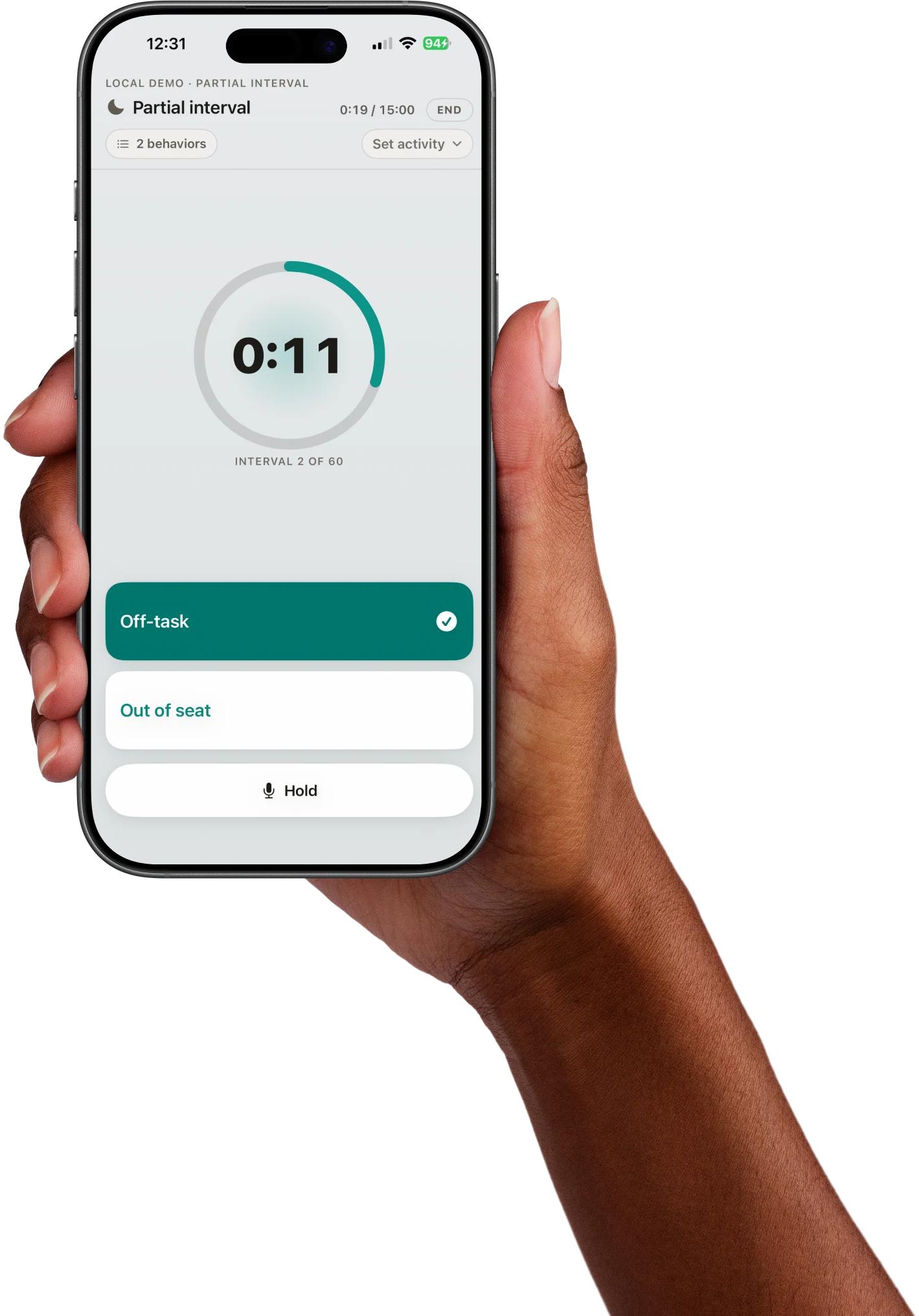
Behavioral observation and data collection that stays on your machine. No cloud. No accounts. No compliance headaches.
Whether you're conducting FBAs in schools or collecting ABA treatment data in clinic, sight·line fits your workflow.
Collect systematic observation data for psychoeducational evaluations, functional behavior assessments, and progress monitoring.
Collect frequency, duration, interval, and discrete trial data across sessions. Track treatment progress with trend analysis.
Most behavioral data tools force you into cloud-based platforms that create compliance liability. sight·line keeps everything local.
Every recording method a behavioral practitioner needs, with the simplicity of a stopwatch.
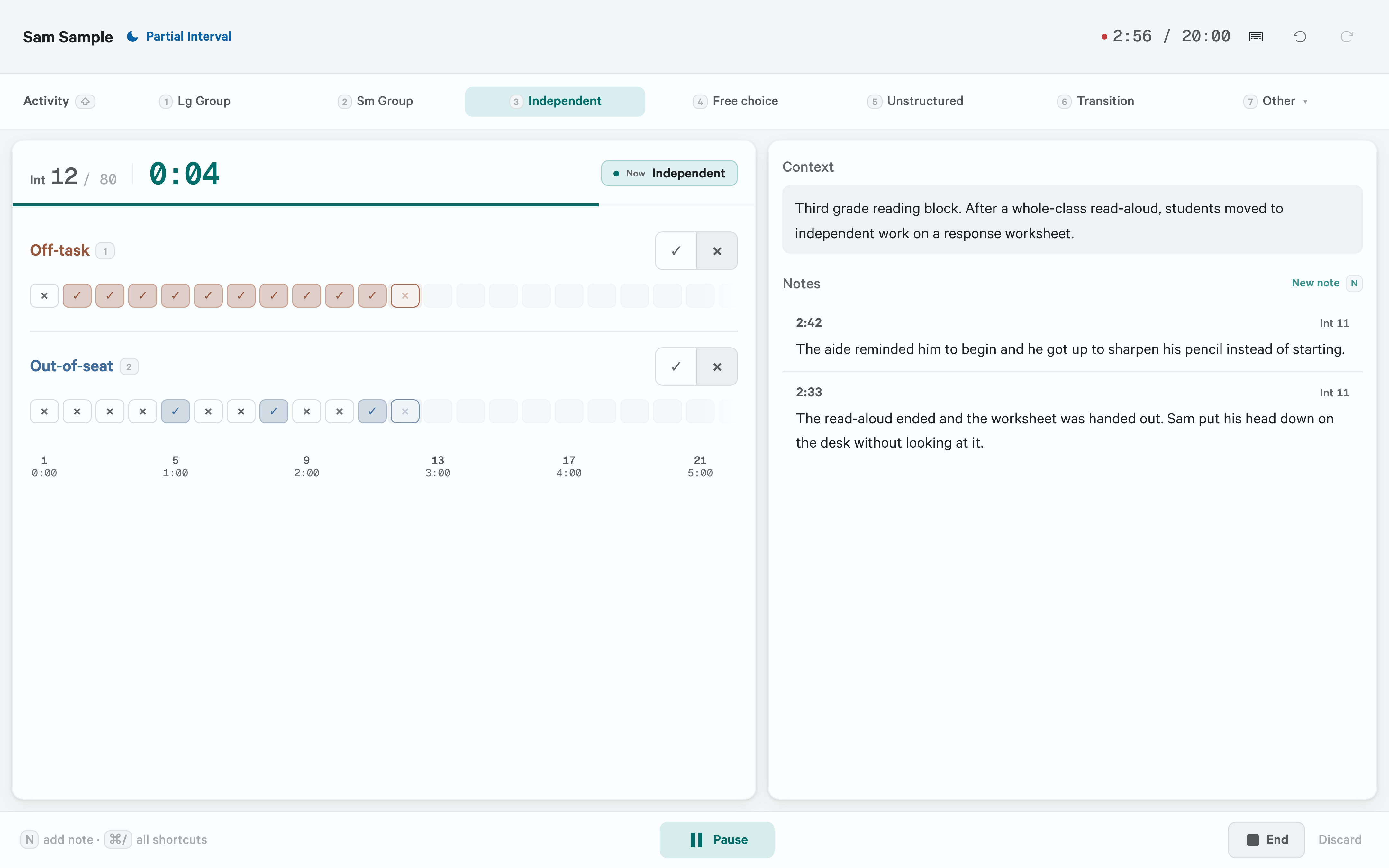
Whole interval, partial interval, and momentary time sampling with configurable durations and audio signals at each interval change.
Count every occurrence within each interval. Automatic rate calculation (events per minute) with running totals displayed live.
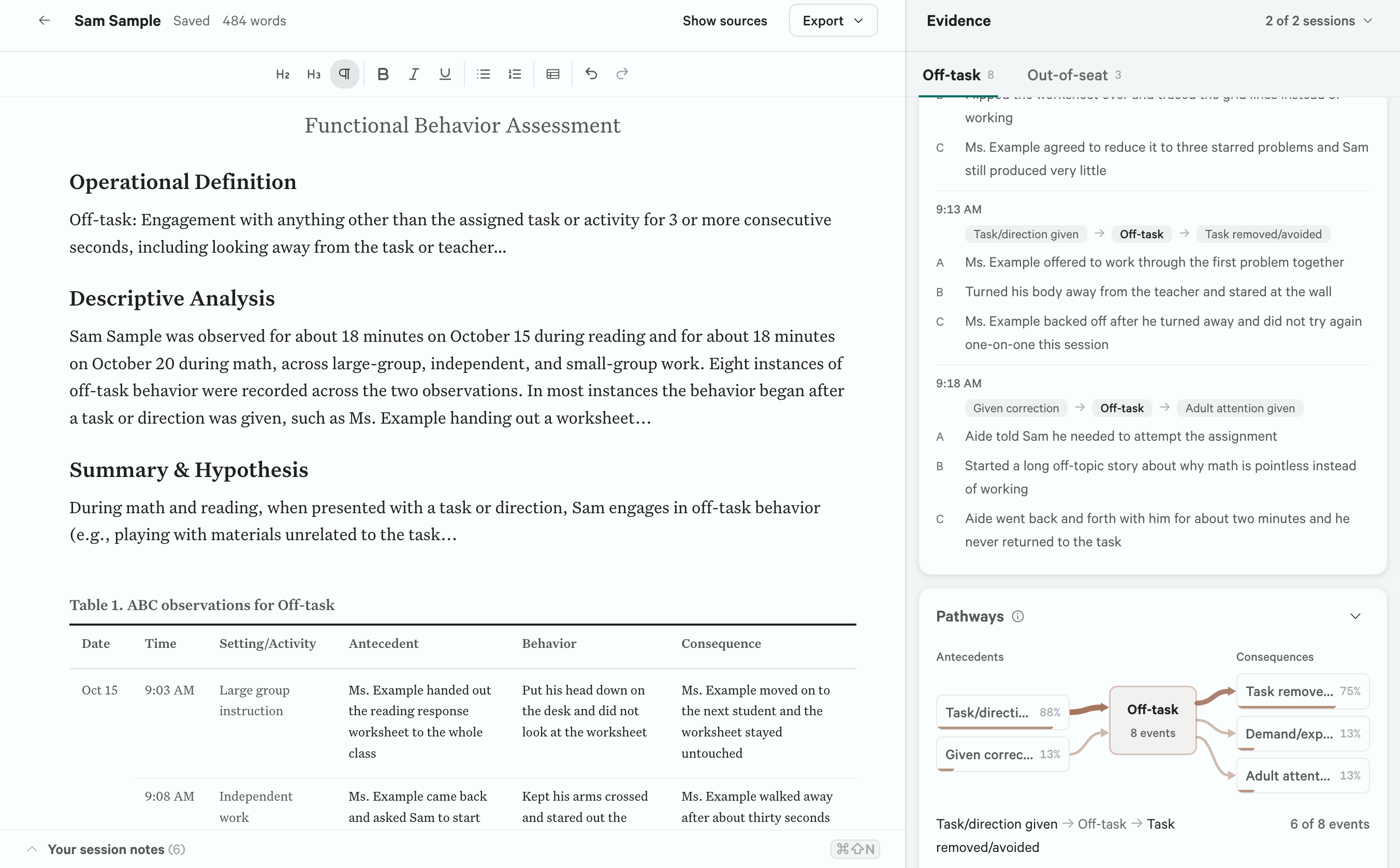
Timestamped antecedent–behavior–consequence entries with configurable tag libraries. Built for functional behavior assessments.
Alternating peer observations at configurable intervals (every 3rd, 5th, 10th). Auto-calculates discrepancy ratios for evaluation reports.
Compare sessions across phases with trend lines, PND calculations, level change analysis, and phase boundary markers.
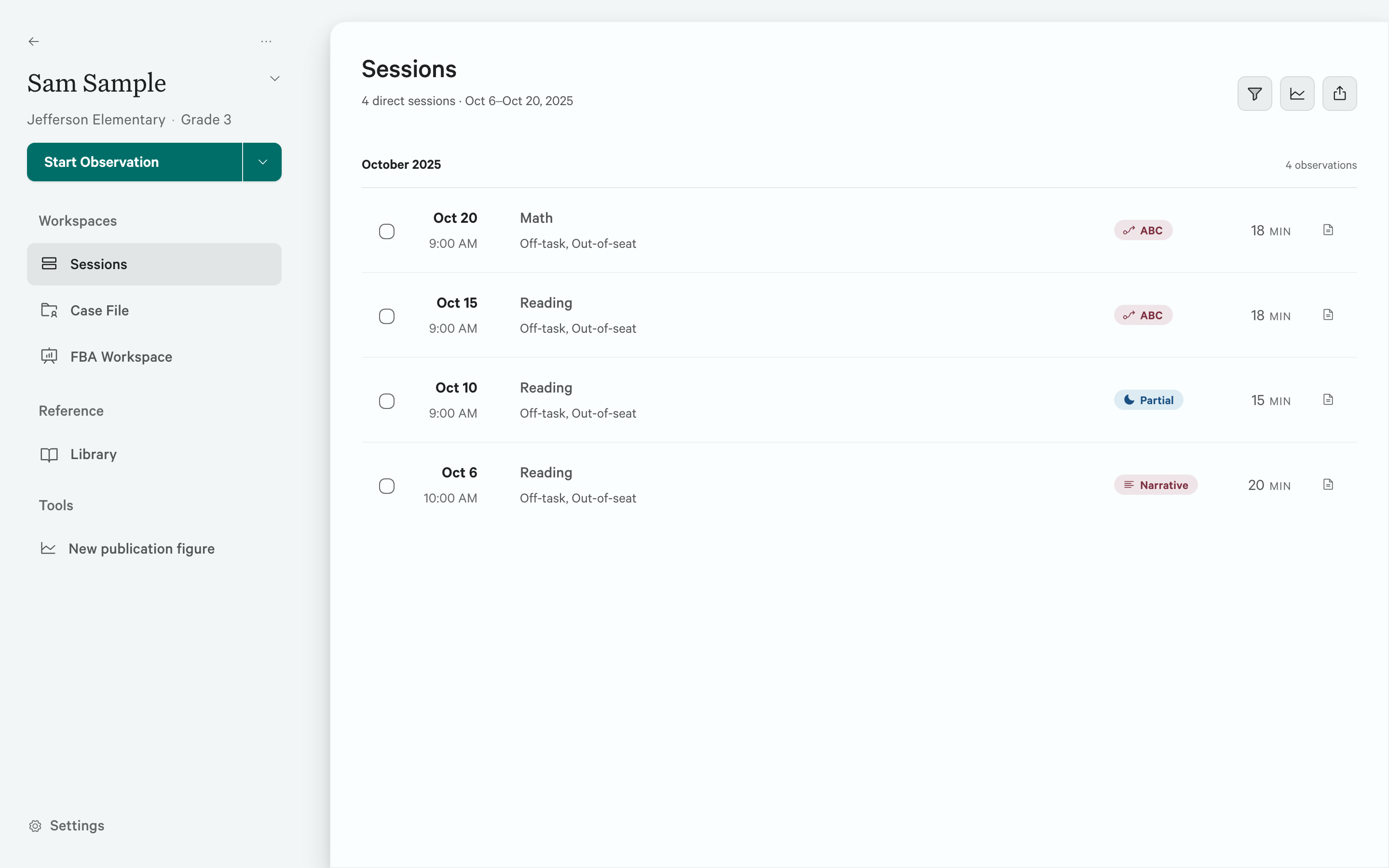
Save full observation configurations as one-click templates. Manage student profiles with intervention timelines and phase tracking.
Generate formatted PDF reports, CSV data exports, and clinical narratives ready to paste into evaluations, IEPs, or progress notes.
20+ research-informed operational definitions built in. Add your own custom definitions, or override built-ins without losing the originals.
Narrative generation, pattern detection, and FBA hypothesis suggestions. Runs entirely on your machine. No data sent anywhere.
Choose whole interval, partial interval, or momentary time sampling depending on whether you need to measure sustained behavior, any occurrence, or point-in-time snapshots. Set your total observation duration and interval length from presets or enter custom values. sight·line calculates the total intervals automatically.
During recording, an audio signal (beep or chime) marks each interval transition so you never have to look away from the student. Score up to three target behaviors per session with single-key presses, and add timestamped narrative notes on the fly.
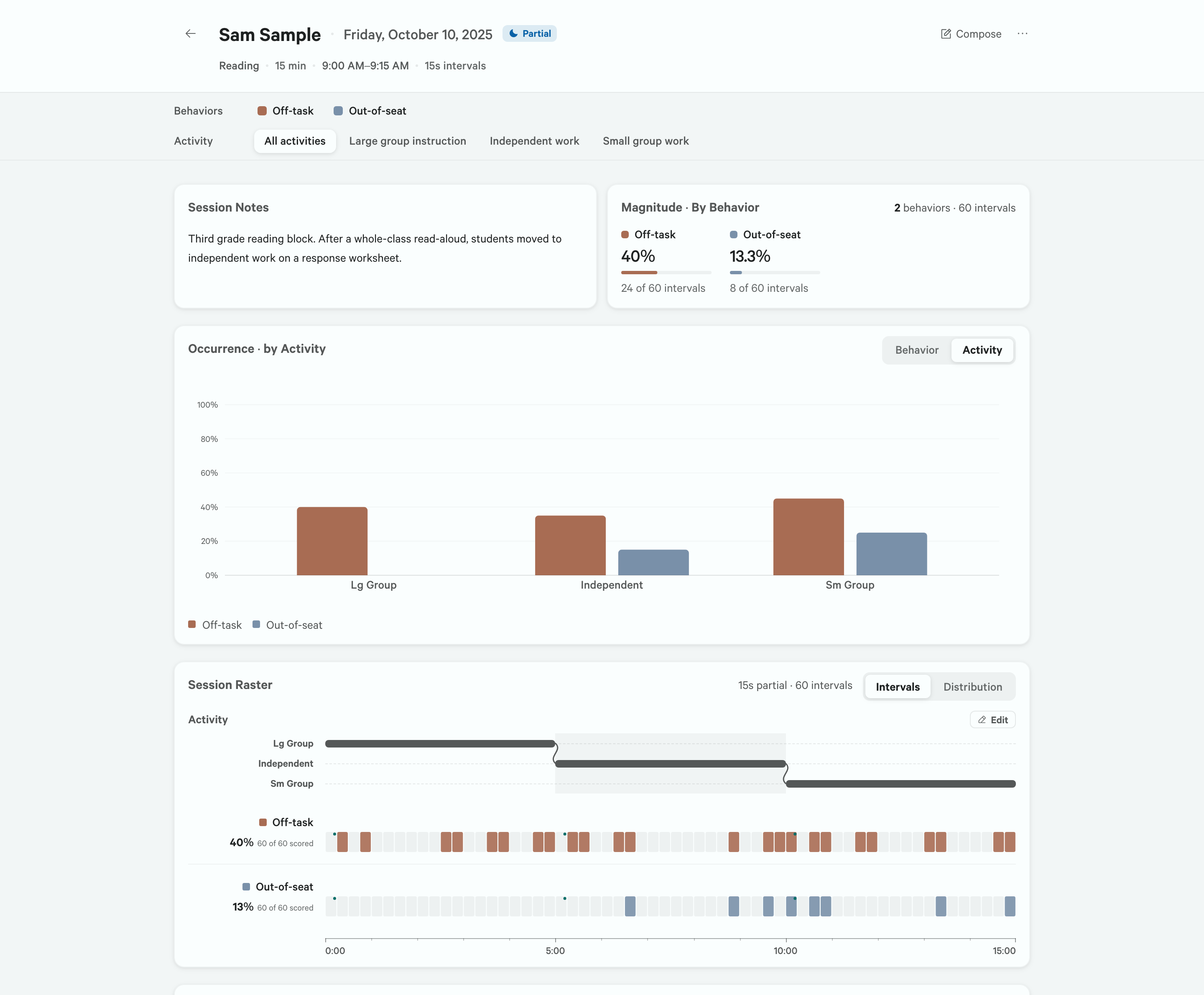
You're observing a 3rd-grader during math instruction. You select partial interval recording, set a 15-minute session with 15-second intervals (60 intervals total), and define two behaviors: "off-task" and "out-of-seat." A chime plays every 15 seconds. You tap 1 or 2 to score, press N to jot "teacher redirected student back to worksheet," and the grid fills in as you go.
Each behavioral event is logged with a timestamp, an antecedent tag, a behavior description, and a consequence tag. Choose from preset tag libraries (common school antecedents like "task demand" and "peer interaction," or clinical sets for ABA), or create your own.
When the session ends, sight·line summarizes which antecedent–consequence chains appeared most often, calculates the frequency of each behavior, and identifies the most common triggers, giving you a data-driven starting point for your FBA hypothesis.
A school psychologist is conducting an FBA for a 5th-grader who engages in verbal refusal and desk-clearing. During a 30-minute observation, she logs 8 ABC entries. Afterward, the results show that 6 of 8 events followed a "difficult task demand" antecedent and resulted in "task removal" as a consequence, strongly suggesting escape-maintained behavior.
Toggle peer comparison on during setup and choose how often to observe the peer: every 3rd, 5th, or 10th interval. During recording, sight·line automatically alternates between your target student and the comparison peer, marking peer intervals in a distinct color on the grid.
When the session ends, you get a side-by-side breakdown: target student percentage vs. peer percentage for each behavior, plus the discrepancy ratio. This is the data special education teams need to establish that a student's behavior meaningfully differs from same-age peers.
During a 20-minute whole-interval observation of on-task behavior, your target student scores 38% while the comparison peer scores 85%. The discrepancy ratio is 2.24:1, which you paste directly into the evaluation report as evidence of behavioral need.
Select any set of sessions for a student and sight·line plots them on a line chart with automatic phase boundary markers. Define intervention phases (Baseline, Treatment A, Treatment B) with start and end dates, and the app groups sessions into the correct phase automatically.
Beyond simple graphs, you get quantitative trend analysis: linear regression with slope and direction, Percentage of Non-overlapping Data (PND) between phases, and level change analysis comparing phase means. These are the statistics evaluation teams and supervisors ask for.
A BCBA pulls up 12 sessions for a client across Baseline (5 sessions) and Treatment (7 sessions). The comparison shows a decreasing trend in aggression (slope: −1.2 per session), PND of 86% between phases, and a level change from a baseline mean of 14.2 events to a treatment mean of 4.8 events. Clear evidence the intervention is working.
Save any observation setup as a template (behaviors, method, timing, peer configuration, ABC tag sets) then load it with one click for your next session. No more re-entering the same configuration for every observation.
Student profiles store intervention phases with start and end dates. When you begin a new session for a student, sight·line automatically assigns it to the correct phase (Baseline, Intervention A, etc.) based on the date, so your trend charts always reflect the right conditions.
The built-in definitions library includes 20+ research-informed operational definitions for common behaviors. Use them as-is, edit them to match your district's language, or add entirely new ones. Your customizations persist without overwriting the originals, so you can always revert.
A school psychologist saves a template called "Classroom Off-Task: 15min PI" for a common observation setup. Over the semester, she uses it for 8 different students, only changing the student name and context each time. Each student's profile shows their intervention timeline, and the compare screen pulls the correct phase boundaries automatically.
sight·line is designed so you spend your time watching the student, not fiddling with software.
Pick a student, define behaviors, choose your recording method, and set the timing. Or load a saved template.
Press Space to start. Score behaviors with number keys. Add notes with N. The timer and grid handle the rest.
Session results appear instantly: percentage charts, trend analysis, and a narrative summary ready to paste into reports.
Every interaction is optimized for keeping your eyes on the student, not the screen.
Score behaviors with 1 2 3, start/stop with Space, add notes with N. You can run an entire session without touching the mouse. Custom key bindings are supported for each behavior.
Press ⌘⇧F to enter a minimal full-screen view showing only the student name, timer, and scoring keys. Perfect when you need maximum focus in a busy classroom.
Session state autosaves every 5 seconds. If your laptop dies mid-observation, reopen sight·line and pick up exactly where you left off. No data lost, no session wasted.
Switch between light mode (bright classrooms with fluorescent lighting) and dark mode (dimmer therapy rooms or home observations). Toggle instantly with ⌘T.
Choose between a beep, a chime, or silent mode for interval transitions. Adjust the volume so the signal is audible to you but unobtrusive to the student and teacher.
Pre-load frequently used observation notes as quick phrases. During recording, start typing and your phrases autocomplete. Set global phrases for all students, or student-specific phrases that appear first.
sight·line's AI runs locally on your machine using open-source models. No internet connection required. No data leaves your device. Ever.
Auto-generate observation narratives from your session data in clinical language ready to paste into psychoeducational evaluations or progress reports. Includes method, duration, behavior percentages, peer comparisons, and trend direction, formatted the way report writers expect.
Identify trends, outliers, and behavioral patterns across sessions that might not be obvious from reviewing raw data. Detects increasing or decreasing trends, calculates effect sizes between phases, and flags sessions that don't fit the overall pattern.
After an ABC session, sight·line analyzes which antecedent–consequence chains occur most frequently and suggests potential behavior functions (escape, attention, tangible, sensory). A data-driven starting point for your professional clinical judgment.
Ask questions in plain English: “Show sessions where off-task exceeded 40%” or “Compare baseline to treatment for Marcus.” The AI searches your session history and returns the relevant data without you clicking through menus.
Try it free. Upgrade when you're ready. Pay once, use forever.
Volume licensing available for school districts, ABA agencies, and training programs. Equip your entire team with a single purchase order.
Contact for Volume Pricing