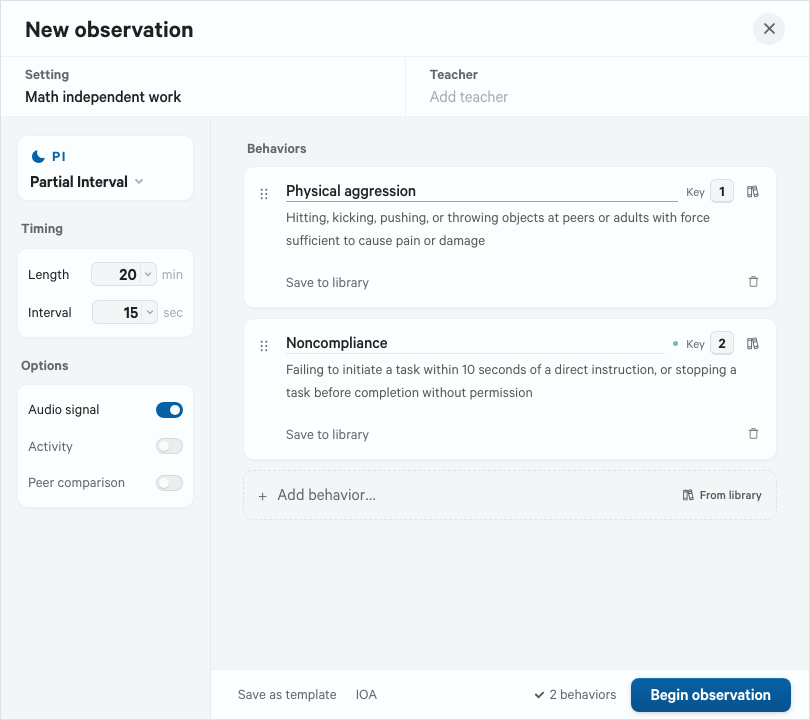
Session setup
One screen sets the behaviors, the method and the timing for this student. Any method, any cadence. Nothing is locked to a preset.
Features
A desktop app for behavioral observation during school-based evaluations, from the first case set-up to the signed write-up.
Designed for flexibility and customization. Save your own operational definitions, ABC tags, and more.
Eyes or body oriented away from the assigned task or materials for three seconds or longer.
Calling out an answer or comment without raising a hand or being called on.
Set once, and the case carries it forward to the next observation.
Timing, coding, notes, all in one window and in one place. Keyboard shortcuts become muscle memory and help keep your eyes off your screen.
1 Off-task2 Vocal disruptionO log a noteSpace pause or resume
Also while recording: Focus mode · In-session definitions lookup · Crash recovery · No mid-session percentages · Protocol notes, cadence and peer settings
Results are ready when the session ends. Nothing to transcribe, unless you want to go back and add more detail later.
Also in analysis: Manual entry
All your notes, data, and document editor, integrated into one workspace.
Sam Sample was observed for 30 minutes during reading, using partial-interval recording with 20-second intervals. The observation spanned one-to-one instruction with Ms. Teacher and an independent work period at a table with a small group of peers.
Sam began the session in one-to-one instruction with Ms. Teacher. He sat down promptly but did not open his reading folder, instead handling and fidgeting with it. He turned in his seat to look toward another table rather than the passage, and at one point put his head down on the table without reading. After a verbal redirect from Ms. Teacher, he picked the book back up about ten seconds later. When directed to the comprehension questions, he flipped pages back and forth without answering, and when asked to respond to the first he said, “I always mess this up,” then pushed the worksheet to the side of the table…
Across six sessions, Sam's work refusal was most often associated with the removal of a preferred activity. In one instance, after a preferred activity was put away and he was asked to count the block groups, Sam put his head down on the table and did not touch the worksheet, and this was followed by a physical prompt along with sensory input and brief access to a preferred item …
During unstructured time, when a preferred activity is removed, Sam engages in work refusal (e.g., pushing materials away, closing a book or device, putting the head down), which typically results in a physical prompt, sensory input, and access to a preferred activity. Therefore, the function of the behavior is hypothesized to be to obtain or regulate sensory stimulation. An escape function cannot be ruled out, but sensory stimulation is the better supported hypothesis …
Also at the write-up: The FBA workspace · Records document and every format · Interview evidence · beta
No. Every statistic in a draft is computed from your intervals and passed through a validator that checks each claim against the underlying data. The model writes prose around numbers it is given; it does not produce them.
On your machine, in one file. There is no account, no sync service and no vendor-side copy. Full detail on the privacy page.
Yes. Recording, analysis, AI drafting and companion pairing all work offline. A licensed copy checks in roughly every seven days.
Everything you have recorded stays on your machine. CSV export and backup and restore are free-tier features, so the raw data comes with you regardless of license.
Yes. Windows x64, Apple Silicon Macs and Intel Macs are all supported.
All eight recording methods, session results, CSV export, and backup and restore. It is a working instrument, not a demo with the useful parts removed.
This page covers what most evaluations lean on, not every capability in the app. If you do not see what you need, tell us and we will point you to it or put it on the list.